PRISM Live Studio is a live streaming software. Users can stream on the platform, choosing their preferred streaming mode and then sharing their hobbies or daily gaming experiences via a shared page or by turning on their webcam. The software requires minimal equipment; a smartphone is all you need to start streaming. It's cleverly designed, allowing users to quickly master its functions. Real-time interaction with viewers is possible during live streams. Earnings are stable and funds are secure. If you're in the self-media industry, you might want to give this software a try.
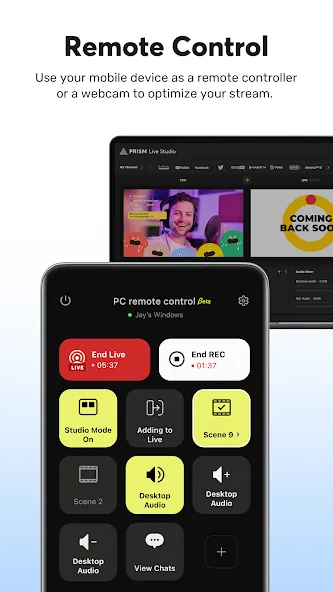
Choose Your Live Mode
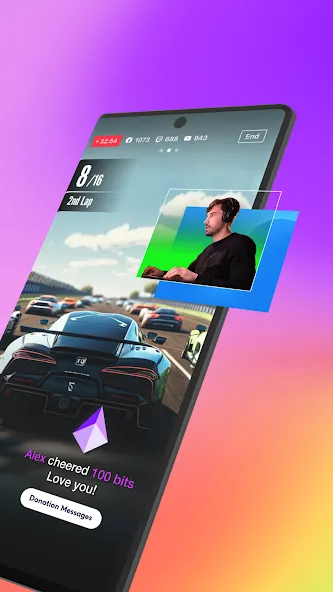
Start your live broadcast with Camera, Screen, or VTuber modes. Stream using your smartphone camera, share your gameplay, or dive into VTubing.
Screencast Broadcasts
Share your mobile screen or gameplay with your viewers in real-time. We offer various options tailored for screen broadcasting.
VTuber Broadcasts
Begin your VTubing journey with just your smartphone! Use custom avatars or the 2D and 3D VRM avatars provided by the PRISM app.
Login-Based Account Integration
Easily link your accounts to YouTube, Facebook, Twitch, and BAND with just a login.
Real-Time Interaction with Viewers
Use the PRISM chat widget to seamlessly view and share viewer chats on your streaming screen. Highlight key messages to display them prominently.
Media Overlay
Enhance your broadcast with photos, videos, music, and playlists via My Studio, and share them with your audience.
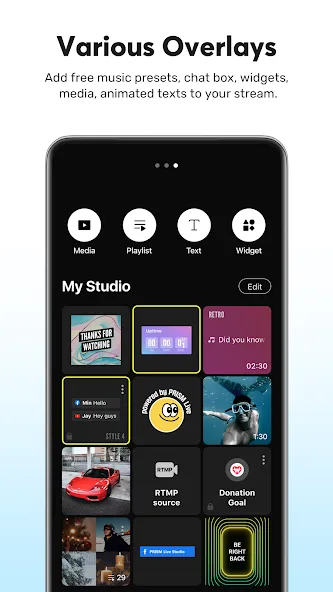
Follow this quick guide to begin your first broadcast. It covers the basic flow from setup to going live so you can test your scene and audio before publishing.
Install the PRISM Live APK, open the app, and sign in with your account. Create a new project and allow camera and microphone permissions if prompted.
Link your streaming channels inside PRISM Live, then set your stream title and description. Choose your destination privacy and check multistream if needed.
After that, pick a mode such as Camera, Screen, or VTuber. Add sources like images, videos, music, and text to build your scene.
Then open Settings to select resolution and frame rate, adjust audio levels, and enable beauty effects or chroma key if required. Use Preview to confirm your layout and sound.
Start the stream and watch the on screen chat widget for messages. So when you finish, tap End, review any save options, and archive your scene for next time.
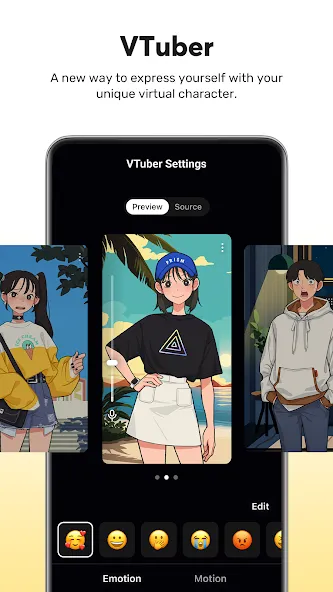
Pros
Flexible live modes for camera, screen sharing, and VTubing
Rich overlay options with media, web widgets, and animated text themes
Beauty filters, masks, and effects that enhance on-camera presentation
Supports up to 1080p, 60 fps streaming when device and network conditions allow
Multi-channel simulcasting with simple account linking to major platforms
Advanced camera controls, chroma key, and AI script extraction for power users
Background streaming and live info editing improve day-to-day usability
Cons
Screensaver customization feels limited for personal branding
Chat experience lacks the smoothness and depth expected from a modern live tool
5 stars app! 3 stars when you want the mic muted. Great App, the free version works great but you will have to accept the watermark and a few greyed out options you cant use. For my use I had issues with audio from my mic being captured even when my mic in the app was muted. The solution was to also mute the mic on the phone on the android level. This created glitches that ended with some streams (Netflix games) not having any audio.
It's decent. Some false advertising on the website though. Multistreaming and removing the watermark all require premium unlike what it said on the website. Overall it's probably the best option to go live on Twitch on just your phone. Sounds like it was better in the past. I hope it gets better in the future.
The app runs smoothly, streams are as the settings says; 720p quality with a 2500~ bit rate. Though, after a little configuration with my mic, there is no internal sound that comes from my phone. Even tweaking the settings for internal capture, I cannot get audio to the streams. If you have any solution to it, please do reply to my review. I really would love to have audio to my streams, since it is more enjoyable with in-game audio in it.
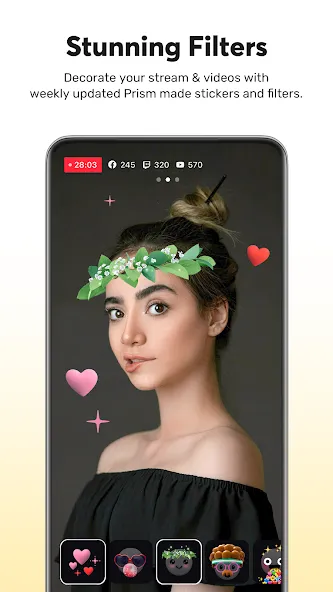
PRISM Live Studio is a perfect tool for live video streaming, which is especially aimed at VTubers and video game streamers. Thanks to this app, you can improve your live streams by adding all kinds of filters and effects in real time. In fact, if you prefer, you can use a 3D animated avatar in all your live streams.
Size:311.99MB Version:5.3.0
Requirements:Android Votes:393
Package Name:com.prism.live Signature:fb7436a0a5d6cf96073f8a5fedc13f18
A video hosting platform that is embedded with live streaming technology can create and broadcast videos in real-time. Live streaming is unlike the pre-recorded videos which can later be edited as required. The video hosting platform is a component that connects the creator and audience. It helps in reaching your business globally resulting in more consumers and leads despite the barrier of physical location like Bon Appetit, Martha Stewart, BuzzFeed and more. As per the reports from Grand View Research, the size of the video marketing industry is likely to reach USD 233.98 billion by 2028. Further, the pandemic outbreak has created a positive impact on the video streaming industry increasing the need for real-time engagement/entertainment.
Live Streaming App is a digital platform that enables users to share real-time video broadcasts with audiences worldwide. It supports diverse content formats including gaming streams, educational tutorials, entertainment shows, vlogs, and interactive personal broadcasts. The platform facilitates instant viewer engagement through live chats, donations, and reactions, creating dynamic connections between creators and their communities. Whether for professional content or casual sharing, it provides accessible tools for real-time video streaming across various interests and purposes.
Live Sports Apps provide a one-stop solution for fans to access real-time scores, live streaming, and in-depth analytics across major global sports. This centralized platform aggregates data from diverse sources, delivering a seamless experience for tracking matches, watching live events, and exploring advanced statistics. With instant updates and customizable alerts, users can effortlessly follow their favorite teams, monitor player performances, and stay ahead of key moments-ensuring they never miss a game, goal, or highlight. Ideal for casual viewers and die-hard fans alike, Live Sports Apps bring the excitement of the stadium straight to your fingertips.
About us | Contact us | Privacy policy| DMCA
Copyright © 2026 Xiaohei All rights reserved.