Switch Access is a versatile basic app that provides comprehensive control over your phone. It quickly provides access to various phone functions, including one-click hands-free control, which is convenient when making calls. It also allows for quick switching between cameras, facial gesture recognition, and flexible document scanning. The app runs in the background, so it won't interfere with your work. It supports Bluetooth and USB connectivity and primarily serves as an auxiliary tool for users to perform various operations on their phones.
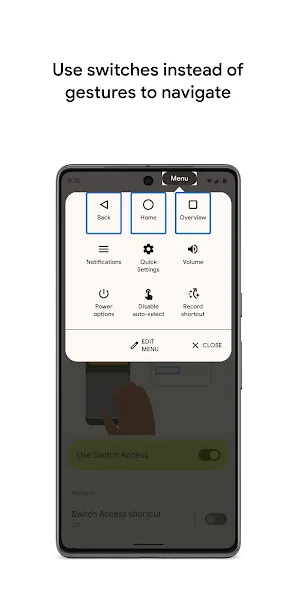
Hands free control
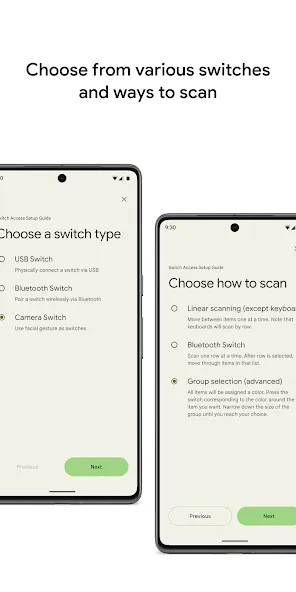
Switch Access lets you navigate using physical USB or Bluetooth switches and standard keyboards. You can also assign actions to on device keys such as the volume buttons. This approach supports users who already rely on external devices and prefer consistent tactile inputs across apps.
Camera switches and facial gestures
You can use front camera detection to control the device with facial gestures. Common gestures include opening your mouth, smiling, raising eyebrows, or looking left, right, or up. Sensitivity and gesture duration can be adjusted so the service recognizes your movements reliably and reduces accidental selections.
Flexible scanning methods
Switch Access offers linear, row column, and point scanning to help you target items efficiently. Color based group selection is also available to reduce the number of steps when the screen is busy. You can test each method and choose the one that matches your speed and comfort, then fine tune scan settings over time.
On screen action menus
Once an item is highlighted, you can open context menus to select, scroll, copy, or paste. Global controls are accessible for notifications, Home, back, and volume changes, which keeps essential actions within reach. This structure reduces the need to switch modes when moving between apps or screens.
Record shortcuts for complex gestures
Switch Access can capture touch gestures such as pinch, zoom, swipe, double tap, and scroll. You then assign a recorded gesture to a switch so the action is available with a single press. This helps repeat frequent tasks and simplifies gestures that are difficult to perform directly.
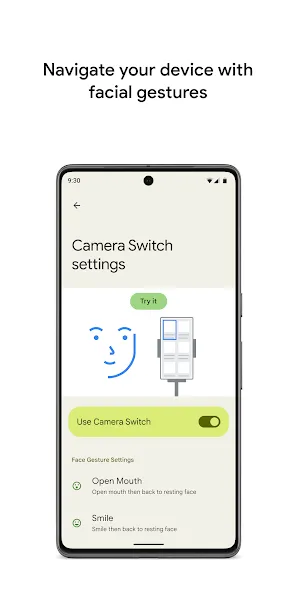
Switch Access is designed to run in the background with minimal performance impact on mid-to-high-end Android devices. Response times for connected physical switches are generally immediate, and the camera-based facial gesture recognition is reasonably accurate in good lighting conditions. Setting up the app requires some initial calibration and user familiarity with Android’s accessibility settings.
The user interface is straightforward, providing step-by-step instructions for adding and configuring switches. Help resources and in-app tips guide users through the initial setup process. For ongoing use, visual cues highlight what is currently selected or scanned, reducing confusion during device navigation.
Switch Access is particularly valuable for users who cannot use touch gestures due to temporary or permanent mobility impairments. It empowers users to independently access messaging, calls, web browsing, and apps by using tools tailored to their abilities. The app’s support for both low-tech (external switches) and high-tech (facial gestures) input options ensures broad compatibility across different needs and preferences.
Pros
An alternative to touchscreen control
Can work in tandem with gestures
Offers touch-free control
Supports Bluetooth and USB switches
Cons
Can sometimes unexpectedly open
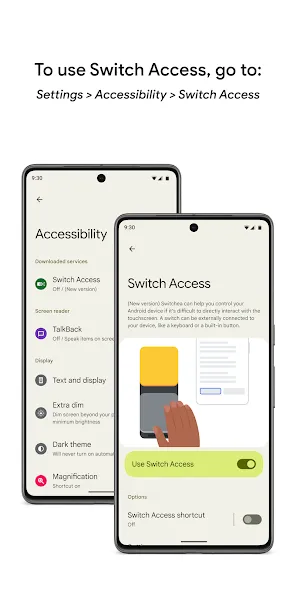
Switch Access is a very useful accessibility app that makes Android devices easier to control for people who cannot use a touchscreen in the usual way. The customizable controls and switch-based navigation provide greater independence and make everyday tasks more accessible. Overall, an excellent and meaningful accessibility tool that helps make technology more inclusive.
Built into android previously, made separate so it can be updated quicker rather than waiting for a System Update! NOT spyware or bloatware - it's just part of the system! People like me use accessibility features, if you don't - do not worry, it will not harm your phone.
This app is for accessibility features I don't get why people cry so much about certain apps on their device. it's accessibility features built into Android. Google has made Android system apps easier to update through the Play store so they can be updated much quicker and rolled out through the Play store instead of waiting for a system update.
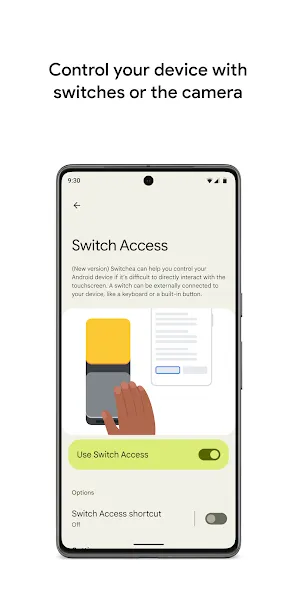
Switch Access is an accessibility app developed by Google to improve accessibility when it comes to navigating your smartphone's interface. Simply choose one of the three available switch modes to start controlling your device in a totally new way.
Size:13.04MB Version:1.17.0.892789133
Requirements:Android Votes:146
Package Name:com.google.android.accessibility.switchaccess Signature:2c883e72166c6c3d137727270dd0a735
Looking for more newly added Android apps and games? BrowseAPKBA Latest Android APK Downloads for recently updated APK pages with version details, package names, safety notes, and download pages.
Stay updated with the latest and hottest apps in one place! Our carefully curated ranking features the most trending, high-rated, and must-have apps across various categories, including entertainment, productivity, social media, and more. Whether you're looking for new tools, fun games, or innovative utilities, this list ensures you never miss out on top-performing apps. Explore the most downloaded and highly recommended applications, all available for instant download. Discover, download, and enjoy the best apps today!
About us | Contact us | Privacy policy| DMCA
Copyright © 2026 Xiaohei All rights reserved.