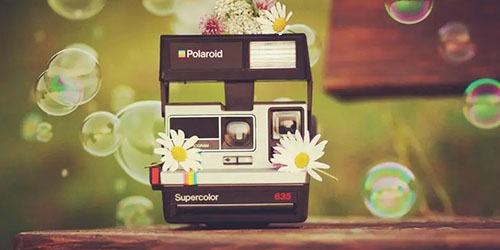
Huji Cam is a uniquely crafted and practical photography enhancement tool that helps users create retro-style photos reminiscent of 1998 using powerful photo filters, delivering unique and stunning visual effects. Huji Cam presents users with a stylish, beautiful, lightweight, and easy-to-use photo filter tool. Users can experience customizable pixelated effects and experiment with various shooting techniques to achieve unique visual aesthetics. Huji Cam boasts a wealth of photo editing tools, allowing you to easily trim your photos to achieve your desired results.
This app mimics a disposable camera, instantly evoking a strong 90s retro vibe. The screen displays a flash button, a shutter button, and a small round lens in the corner. It might be a little confusing at first, but if you're familiar with how disposable cameras work, you'll easily get started with Huji Cam. However, before trying it out, please note that you won't see anything if you look directly at the Huji Cam lens. To preview your subject, press the camera button; a preview window will pop up, occupying about two-thirds of the phone screen. The remaining space is used for the shutter, flash, and lens buttons. Of course, for the full experience, you can choose not to open the preview window and shoot blindly. Even without the preview window, Huji Cam works perfectly. To take a picture, simply tap the shutter button.
After taking a picture, the app loads it for a few seconds, roughly the time it takes to develop or print a photo at a photo lab. This short wait is worthwhile, as the final result looks like a 90s photo. That said, the retro filters are applied completely randomly; aside from the date stamp, you have no control over other effects. Unlike other photo editing apps (such as Retrica and Instagram), you can't choose which retro filters to apply, or even adjust other elements of the photo, such as brightness, contrast, and color temperature. Huji Cam does all this automatically after taking the picture, but this isn't necessarily a bad thing.

Recreating Simulated Scenery: The app helps users recreate the nostalgic beauty of old movies with a warm aftertaste, resulting in the most captivating experience. Add subtle imperfections: You can add subtle imperfections to create character in your videos, such as grain for realism or light leaks.
Create a sense of timelessness: Modern digital filters can't compare to the film filters available; this app enhances the modern feel while maintaining film quality.
Simulate a disposable camera: This app simulates the shooting experience of a disposable camera.
Eliminate complicated settings: If you only want to use a particular moment, you can crop and remove complicated settings to focus solely on that moment.

HUJI Cam records the moment with a film-like texture, making it as precious as a cherished memory.
Camera manufacturers of every era strive to capture the best moments, and 1998 was no exception. This is why our memories are so vivid. HUJI Cam embodies the spirit of that era: capturing precious moments more clearly and vividly. If you're ready to encounter 1998, press the shutter.

Pros
Simple and easy to use
Customizable timestamps
Clean and organized interface
Preserves both original and edited photos.
Cons
Very limited customization options
Unable to manipulate other photo elements
No retro filters available.
Video not supported.

While you can't control the final look of your photos, you can at least add random lighting effects or customize timestamps. Huji Cam is simple to use yet perfectly captures classic 90s photos.
Size:30.8MB Version:2.5
Requirements:Android Votes:130
Package Name:kr.co.manhole.hujicam Signature:ca01c69d81b8648a01e33209f158ff1841473057

A collection of essential beauty camera tools designed to instantly enhance your photos. Whether you’re perfecting your selfies or creating stunning images, these tools help you achieve flawless results with just a few taps. Ideal for anyone looking to elevate their photo game effortlessly.
Photography is an art form that has been around for over a century and has evolved greatly over the years. With the advent of technology, photography has become more accessible and convenient, especially with the rise of mobile photography. Mobile photography has revolutionized the field of photography, making it possible to capture and edit high-quality photos right from your smartphone. As mobile photography continues to grow in popularity, there is an abundance of mobile apps available for photography enthusiasts. However, with so many options available, it can be difficult to determine which apps are worth your time and investment. In this article, we’ll take a look at the top mobile apps for photography and provide you with a comprehensive guide to help you choose the best app for your needs.
Transform your smartphone into a powerful creative tool with these top-rated camera apps. Packed with professional-grade editing features, stunning filters, and advanced effects, they help you capture and refine every shot like never before. Perfect for landscapes, portraits, or spontaneous selfies, these apps offer intuitive controls and AI-powered enhancements-all for free. Download today and unlock your full artistic potential. With these apps, your photos will stand out with polished, professional quality, making every moment picture-perfect!
About us | Contact us | Privacy policy| DMCA
Copyright © 2026 Xiaohei All rights reserved.