YouCam Perfect is an excellent AI photo editing tool. This app offers a range of editing tools and AI beautification features, helping users transform their photos into perfect works of art. With YouCam Perfect, users can easily slim their waists, remove blemishes, and create stunning collages using a multitude of tools. You can also experiment with different filters and frames to add various creative touches to your photos and fully express your ideas. Whether you want to remove background objects, create fun avatars, or beautify selfies, this app can meet your needs.
AI photo repair and enhance
YouCam Perfect revives faded or blurry shots, sharpens details, and adjusts lighting, brightness, contrast, and shadows. Additionally, unwanted objects or people can be removed cleanly, and backgrounds can be cut out for transparent PNG exports. Edits aim for natural output, so facial and scene details stay consistent.
Text to Image and Image to Image
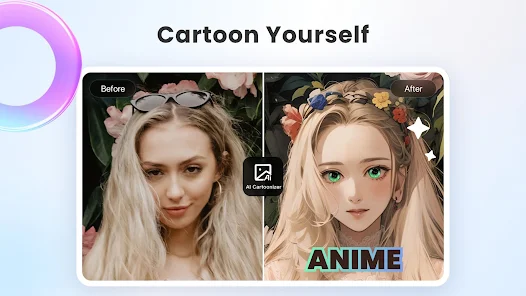
Generate images from short prompts or transform existing photos in one tap. Choose from over thirty styles, from realistic portraits to artsy looks. Options can expand with the YouCam Perfect latest version, and you can adjust strength and prompts to match the style you want.
Image to Video animation
Turn a still photo into a short animated clip for quick sharing. In addition, try trending effects like AI Hug or AI Kiss to create emotional moments that suit stories.
Beauty and body editor
Beautify selfies with skin smoothing, teeth whitening, and blemish removal in one tap. You can apply makeup presets or fine tune lipstick, blush, and contour for control. For portraits, reshape facial features and refine body shape or height with sliders that support subtle changes.
Take advantage of the AI tools to remove unwanted objects from your photos. With the object removal and background removal features, you can instantly improve the quality of your images by erasing distractions. The AI background extension tool allows you to expand your images to any preferred size, giving you more flexibility in editing.
Experiment with the generative AI tools to create unique and personalized photos. Use AI Headshot to generate professional headshots for your resumes or LinkedIn profiles. Have fun creating entertaining AI avatars with over 30 avatar styles. Try different AI filters to enhance your selfies and make them stand out. Transform your pet's photo into a customizable avatar with Pet Avatar.
Use the body tuner and blur tools to enhance your photos. Get a slim waist with the waist shaper tool and amuse your friends with creative edits. Highlight important aspects of your photos to make them more impactful.

How do I remove an object from the background using this app?
You can use the magical object remover tool in this app to instantly erase unwanted background objects. Simply select the object you want to remove, and the app will remove it for you, leaving a clean background behind.
Can I create professional headshots with this app?
Yes, YouCam Perfect's AI Headshot feature allows you to generate professional and polished headshots. This is perfect for resumes or LinkedIn profiles.
Can I adjust my body shape in photos using this app?
Yes, it's Body Tuner tool allows you to adjust your body shape in photos. You can achieve a naturally looking slim waist with just one click.
How do I enhance the quality of my photos in YouCam Perfect?
You can use the AI Enhancer tool in YouCam Perfect to improve the quality of your photos. It sharpens details, reduces noise, and enhances overall image quality.
What's New in YouCam Perfect?
Ditch the dark circles with our all-new Dark Circle retouch feature! Instantly brighten up your eyes in photos.
Revamped photo filters are here! Enjoy a cleaner, smoother UI with easier navigation. Make your pics pop!
Make sure you're on the latest version -- update now!
P.S. If you're enjoying the app, don't forget to rate & review.

This app is a solid match for social media enthusiasts, content creators, and casual users who want their photos to look clean and stylish without spending hours in complex software. It also fits well for pet owners, event photographers, or anyone seeking creative yet quick edits on the go. Its mix of straightforward usability and deep editing capabilities makes it adaptable to a variety of needs.
Size:131.0MB Version:6.19.2
Requirements:Android Votes:126
Package Name:com.cyberlink.youperfect Signature:646b15e609c9694f7f2f8f6320fe46678118ff2c


Photography is an art form that has been around for over a century and has evolved greatly over the years. With the advent of technology, photography has become more accessible and convenient, especially with the rise of mobile photography. Mobile photography has revolutionized the field of photography, making it possible to capture and edit high-quality photos right from your smartphone. As mobile photography continues to grow in popularity, there is an abundance of mobile apps available for photography enthusiasts. However, with so many options available, it can be difficult to determine which apps are worth your time and investment. In this article, we’ll take a look at the top mobile apps for photography and provide you with a comprehensive guide to help you choose the best app for your needs.
AI Photo Editing Apps - encompassing both image generation and enhancement tools - utilize cutting-edge machine learning algorithms to produce, refine, or transform visuals using text prompts, uploaded images, or artistic preferences. These powerful applications are reshaping digital art, photography, and media production by streamlining sophisticated processes such as professional-grade retouching, artistic style replication, and completely AI-generated artwork. By combining automation with creative control, they empower users to achieve stunning results with unprecedented speed and precision.
The demand for taking and editing images is increasing among modern people, and free image editing software has become an ideal choice to meet this demand. Through these apps, users can easily edit images, including cropping, rotating, adjusting brightness and contrast, and more. At the same time, they also provide rich filters and special effects to make your photos more vivid and artistic. In addition, these software also support adding elements such as stickers, text, and graffiti to make your pictures more personalized. Most importantly, these apps are very easy to use and do not require professional skills. Just a few steps can make your photos stand out. Whether you want to post a stunning photo on social media or add some creativity to your album, these free photo editing apps can meet your needs. Try one out!
About us | Contact us | Privacy policy| DMCA
Copyright © 2026 Xiaohei All rights reserved.