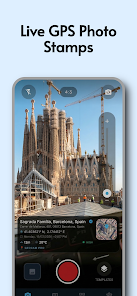
GeoCam Pro - GPS Map Camera is a unique camera application. Every photo you take is automatically mapped with geographic data, including latitude, longitude, address, country, and more, allowing you and everyone who sees the photo to clearly know when and where it was taken. In addition to geographic location, it automatically retrieves local weather data from OpenWeather, adding weather conditions and temperature readings to your photos. One photo, everything you need!
Grant location and camera permissions, select overlay settings, and take photos from the live view.
Adjust the map style, text, and location before saving to ensure the required information is displayed correctly.
View saved images and check the EXIF data to confirm coordinate and timestamp details.
1. Precise Geotagging and Watermarking:
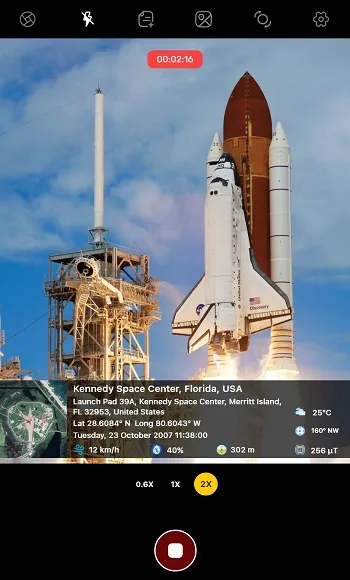
Every photo you take is automatically added with comprehensive geographic metadata. We provide the evidence you need for professional documentation.
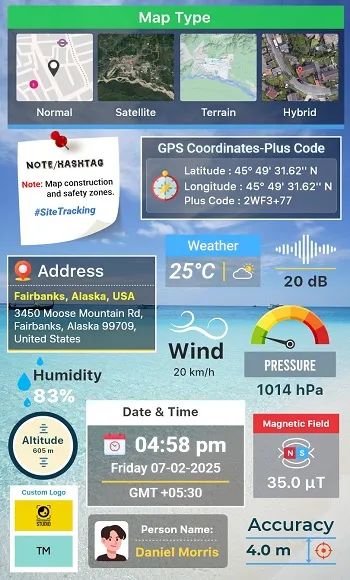
GPS Coordinates: Displays accurate latitude and longitude in multiple formats (decimal, degrees, minutes, seconds, GPS).
Altitude:Automatically obtains your vertical altitude relative to sea level—essential for hiking, aviation, and construction.
Smart Compass: Integrated magnetic azimuth accurately displays the direction you are facing (North, South, East, West).
Date and Timestamp: Unmistakable proof of time, formatted in your local time zone.
2. Live Map Camera Overlay:
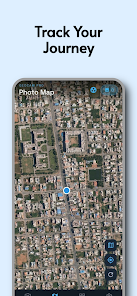
View your location and environment in real time before shooting. Our mini-map overlay gives you a visual understanding of your position relative to landmarks.
Standard/Road Map: Ideal for city navigation and address verification.
Satellite View: Provides detailed aerial imagery for remote areas and construction sites.
Terrain View: Provides detailed terrain information for outdoor exploration and geographical research.
Hybrid View: Combines the advantages of both—satellite imagery and clear road labels.
3. Automatic Weather Environment:
Capture not only beauty but also atmosphere. GeoCam Pro automatically retrieves local weather data powered by OpenWeather, providing contextual information for your field reports.
Temperature: Current temperature reading.
Weather Conditions: Icons and text descriptions for sunny, cloudy, rainy, and snowy days.
Atmospheric Conditions: Detailed humidity and wind speed data.
4. Designed for Industry Professionals:
GeoCam Pro is trusted by experts across various fields, streamlining workflows and improving documentation:
Civil Engineering & Construction: Track daily progress, record safety hazards, and create defect lists with location tags.
Real Estate & Construction: Take photos of properties with verified addresses and orientations for client listings.
Land Surveying: Record precise points of interest and boundaries with elevation data.
Security & Patrol: Provide tamper-proof attendance records and patrol routes for security logs.
Agriculture & Farming: Monitor crop health and farmland conditions using location-specific tags.
5. Fully Customizable Templates:
Your data, your design.
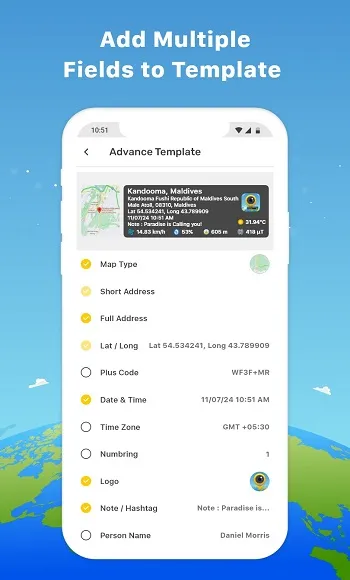
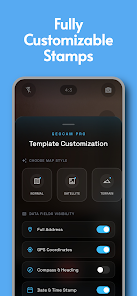
Custom watermarks to suit your professional needs or personal style.
Location: Move data watermarks to the top, bottom, or corner to avoid obscuring the subject.
Data Selection: Turn specific data on/off. Don't need weather information? Hide it. Just need coordinates? Show them separately.
Visual Style: Adjust text color and background to ensure readability on any background.
6. Privacy-First Design We respect your data.
GeoCam Pro is a tool that supports offline use.
100% Local Storage: All photos and metadata are saved directly to your device's gallery.
No Cloud Uploads: We do not track your browsing history or upload your images to external servers. Your data always belongs to you.
Location: Used to add geotags to your photos and videos.
Camera: Required for taking photos and videos.
Storage: Used to save and manage your media files.
Pros: Create cool photos and videos. Includes a wealth of useful geographic data.
Cons: Contains ads.
Add geotags, GPS location, date and timestamps, and map views to your photos using the GPS Map Camera app. This GPS camera app helps you take photos with reliable location information every time.
Size:33.5MB Version:5.34
Requirements:Android Votes:503
Photography is an art form that has been around for over a century and has evolved greatly over the years. With the advent of technology, photography has become more accessible and convenient, especially with the rise of mobile photography. Mobile photography has revolutionized the field of photography, making it possible to capture and edit high-quality photos right from your smartphone. As mobile photography continues to grow in popularity, there is an abundance of mobile apps available for photography enthusiasts. However, with so many options available, it can be difficult to determine which apps are worth your time and investment. In this article, we’ll take a look at the top mobile apps for photography and provide you with a comprehensive guide to help you choose the best app for your needs.
Transform your smartphone into a powerful creative tool with these top-rated camera apps. Packed with professional-grade editing features, stunning filters, and advanced effects, they help you capture and refine every shot like never before. Perfect for landscapes, portraits, or spontaneous selfies, these apps offer intuitive controls and AI-powered enhancements-all for free. Download today and unlock your full artistic potential. With these apps, your photos will stand out with polished, professional quality, making every moment picture-perfect!
About us | Contact us | Privacy policy| DMCA
Copyright © 2026 Xiaohei All rights reserved.