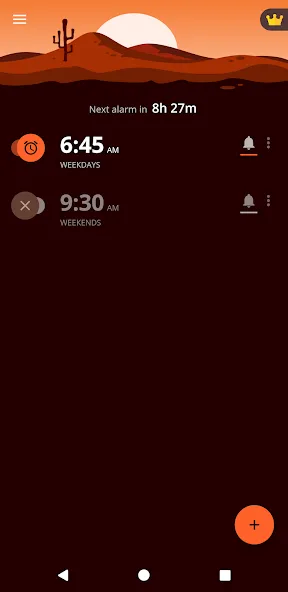
Alarm Clock Xtreme is an alarm clock app designed for mobile devices, offering users a wealth of customization options. You can freely set the alarm time, interval, and ringtone, and adjust the size and position of the stop button or turn it off using the volume buttons, power button, etc., ensuring it wakes you up precisely at the designated time. For ringtones, users can use the default sound or import their favorite music. The app also includes built-in timer, stopwatch, and calendar functions for convenient use in different environments, and can record your daily schedule for easy review.
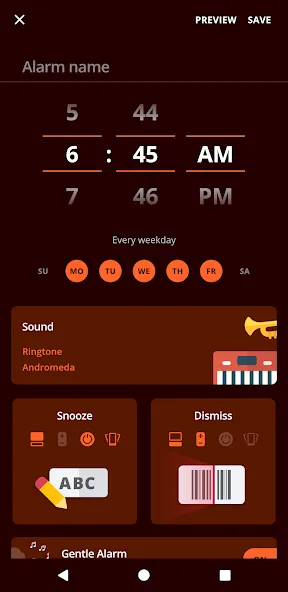
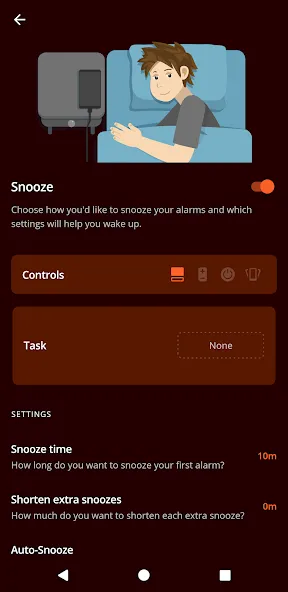
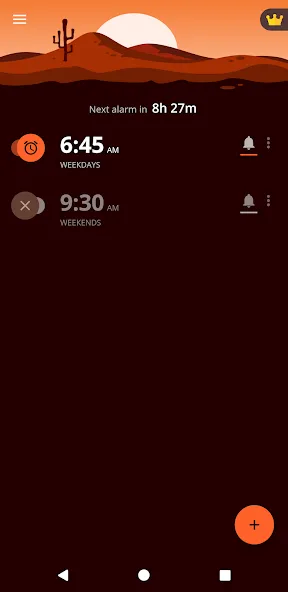
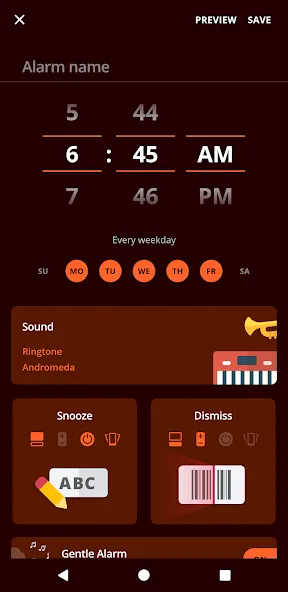
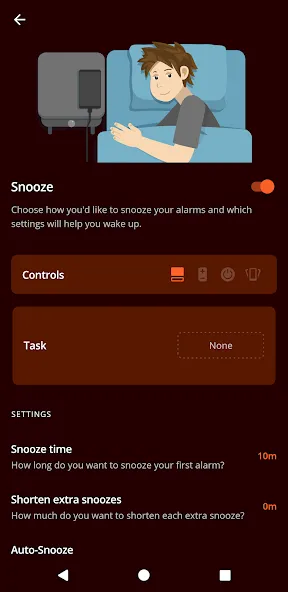
Snooze Controls That Fight Back: The app gives heavy sleepers more leverage than a basic clock. Alarm volume can rise gradually, while snooze intervals can shorten each time and stop after a chosen maximum. An extra-large snooze button reduces the chance of pressing dismiss by mistake, and Quick Alarm handles one-time alarms without creating a recurring schedule.Dismissal puzzles provide the strongest defense against sleepy reflexes. You can solve up to five math problems at a selected difficulty, retype an on-screen password, or scan a stored QR code. Placing that code away from the bed forces you to stand up, which is inconvenient by design and likely the most useful option for persistent oversleepers. Dismissal can also use screen, volume, or power buttons, as well as a phone-shaking gesture, if puzzles feel excessive.This depth makes Alarm Clock Xtreme best suited to people who repeatedly silence ordinary alarms without fully waking. Anyone who rises reliably at the first ring may find much of it unnecessary, but the simpler settings remain available.
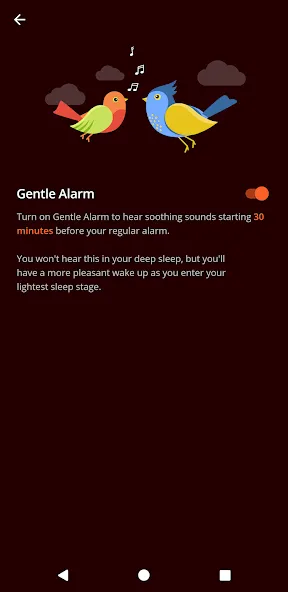
Music, Radio, and a Gentler Start: Alarm sounds can come from the phone's default ringtones, downloaded music, or online radio stations. A vibration-only setting is available when sound would disturb someone else, and a random-song option keeps the morning routine from becoming too familiar. The increasing-volume alarm is a thoughtful alternative to starting the day with an abrupt blast.An upcoming-alarm notification lets early risers cancel an alarm before it sounds. Afterward, My day can show the weather forecast and calendar events, including the first appointment of the day. These additions are practical rather than essential, but they reduce the need to open several apps immediately after waking.
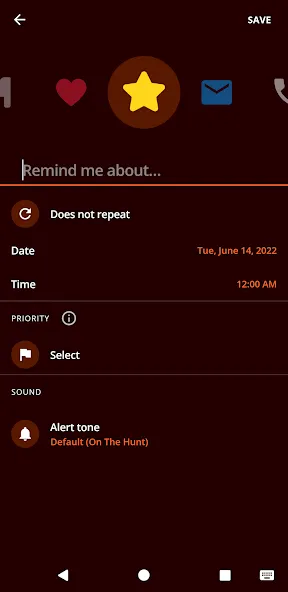
Timers and Reminders Beyond the Morning: The supporting tools are substantial enough to earn their place. Multiple timers can run for cooking, exercise, or other tasks, while the stopwatch records total time and split or lap results to one-hundredth of a second. Reminders support custom names, icons, ringtones, and priorities, with schedules ranging from yearly to several times per day.These tools make the app more useful throughout the day, although its strongest reason for replacing the standard Android clock remains the alarm behavior. The timer and stopwatch are straightforward conveniences; the configurable snooze limits and dismissal barriers are the features that materially change how waking up works.
The app also includes a built-in timer, which can be used for various activities such as cooking or exercising. Users can enter the required time and start the timer, with the ability to set multiple timers simultaneously. The straightforward interface ensures that users can manage their time efficiently. In addition to the timer, the stopwatch feature offers reliable tracking for split times and total duration, providing a simple yet effective tool for timing events.
For those who want to stay organized, Alarm Clock Xtreme includes a reminders feature. Users can set reminders for important tasks or events, ensuring that they never forget essential commitments. This adds a layer of utility beyond just waking up, making the app a comprehensive productivity tool.
The app's alarm dismissal options are diverse. Users can choose from several methods to turn off the alarm, including screen buttons, volume buttons, power buttons, or even shaking the device. This flexibility allows users to select the method that feels most comfortable and effective for them.
Another feature worth noting is the nap alarm function, which allows users to set a countdown timer for short naps. This is particularly helpful for those who may need a quick rest during the day without oversleeping. The app also provides auto-snooze and auto-dismiss options, which can be tailored to the user's preferences, further enhancing the waking experience.
Customization extends to the visual aspect of the app as well. Users can personalize each reminder with unique names, icons, or ringtones. Additionally, the ability to set repeat intervals—annually, monthly, weekly, daily, or hourly—ensures that reminders fit seamlessly into the user's routine.
Apparently I've been using this alarm for 10 years now! I wish it had a watch OS version, devs please consider it. would love to have a vibration only alarm -- original review - 11/18/15 I am always sleeping through my alarms. The customizable settings keep me from snoozing too many times and forces me to wake up. I love that I can change up the routine every once in a while so I don't get used to it and start oversleeping again like I do with most alarms.
This is a good replacement for the now abandoned AMdroid. there are a few features I'd love to see in the future such as requiring a task to delete an alarm, adding an option to the rewrite task that allows you to have to type the title of your alarm (or a custom message per alarm), and the option to have text to speech read out the title of your alarm. I'm also not a fan of the snooze screen. I'd love to have an option for snooze to take me back to the previous screen that I was on.
Automated my morning schedule! As a person who struggles with adhd, getting up and going is the most challenging part of my day. I've set up a series of alarms that automate my way through my morning tasks. It's a little bit annoying to set up, mostly because I have so many check-in points I need, but I was able to create a backup so that was a one-time hassle. I'm excited to see what other uses I find for it! And it's cheap! Similar apps have an annual fee. I like the one and done.
I've used this app for 16 years, and never needed another. While I am apparently getting good at doing simple math in my sleep when I am too sleep-deprived, the customization options have been super useful for normal sleep rhythms as well as nighttime work and disgustingly early mornings to catch cheap flights.
Can I keep my Alarm Clock Xtreme settings if I change or restore my device?
On Android 6.0 and later, Alarm Clock Xtreme is linked to your Google Account. This means that if you change to a new device or reset your current device, the app retains your configured alarms and other settings as long as you are signed in to the same Google Account. Automatic backup is not currently possible on Android 5.0 and earlier.
How can I uninstall Alarm Clock Xtreme?
On the Home screen of your device, tap the Google Play Store icon to open the store.
Search for Alarm Clock Xtreme.
Open the Alarm Clock Xtreme product page, then tap Uninstall ▸ Uninstall.
Alternatively, tap and hold the Alarm Clock Xtreme icon on your device's Home screen, then select Uninstall.
Alarm Clock Xtreme is now uninstalled from your Android device.
Why do I see ads in Alarm Clock Xtreme?
To support the ongoing development of Alarm Clock Xtreme, the app includes unobtrusive ads that do not interfere with app usage. No more ads is one of the premium items available for purchase via the Premium screen in Alarm Clock Xtreme. To remove third-party ads from Alarm Clock Xtreme:
Tap the crown icon in the top-right corner of the main app screen.
Tap the No more ads tile to purchase this item only. Alternatively, tap the Get all tile to purchase all premium items simultaneously.
Tap the Buy button and follow the on-screen instructions to complete the transaction.
How can I remove a Timer?
Tap Timer on the bottom of the main app screen.
If the timer you want to delete is running, tap the pause icon.
Swipe left on a timer panel until the timer disappears.
If you delete a timer by mistake, retrieve it by tapping the Undo button that briefly appears at the bottom of the screen.
Can I share my Stopwatch results?
Yes. You can share your results directly after you use the Stopwatch feature:
If Stopwatch is still running, tap the pause icon.
Tap Share in the bottom-right corner.
Select the email or messaging application that you want to use to share your results.
Complete the necessary steps within the selected app to share your results.
Alarm Clock Xtreme is perfect for those who use their phone for work, as it can remind you of important events that may come up. It's also a great option for people who use their phone for leisure, as they can set it to remind them of when they need to call a friend or go on a trip.You can choose to have it alert you of upcoming events, which can be a great help if you use this app for work.
Size:18.76MB Version:24.16.4
Requirements:Android Votes:265
Package Name:com.alarmclock.xtreme.free Signature:229785be72a38781793cf70a51250ccb
Feeling that there aren’t enough hours in the day? That you’re fighting a losing battle with your agenda? That each time you look up from your desk another year has rolled by? Well don’t worry, you’re not alone, and in today’s hyperconnected world, people are busier than ever before. On Android, there are countless productivity apps to help take control of your time and make your work more efficient. From a simple plugin for Chrome to a full-fledged app, picking the right productivity apps on Android can mean the difference between having a clear to-do list at the end of the day or having it overflowing with missed deadlines and projects that are off schedule. Productivity apps aren’t just about work, though. Using a productivity app in your personal life can keep you on top of deadlines for vacations, home repairs, and other family responsibilities.
Office Apps is a comprehensive and user - friendly platform that aggregates a wide array of office - related applications, catering to the diverse needs of modern professionals, students, and anyone who engages in office - based tasks. Whether you're working on a crucial business project, preparing academic papers, or handling daily administrative work, this aggregation page serves as your one - stop - shop.
About us | Contact us | Privacy policy| DMCA
Copyright © 2026 Xiaohei All rights reserved.