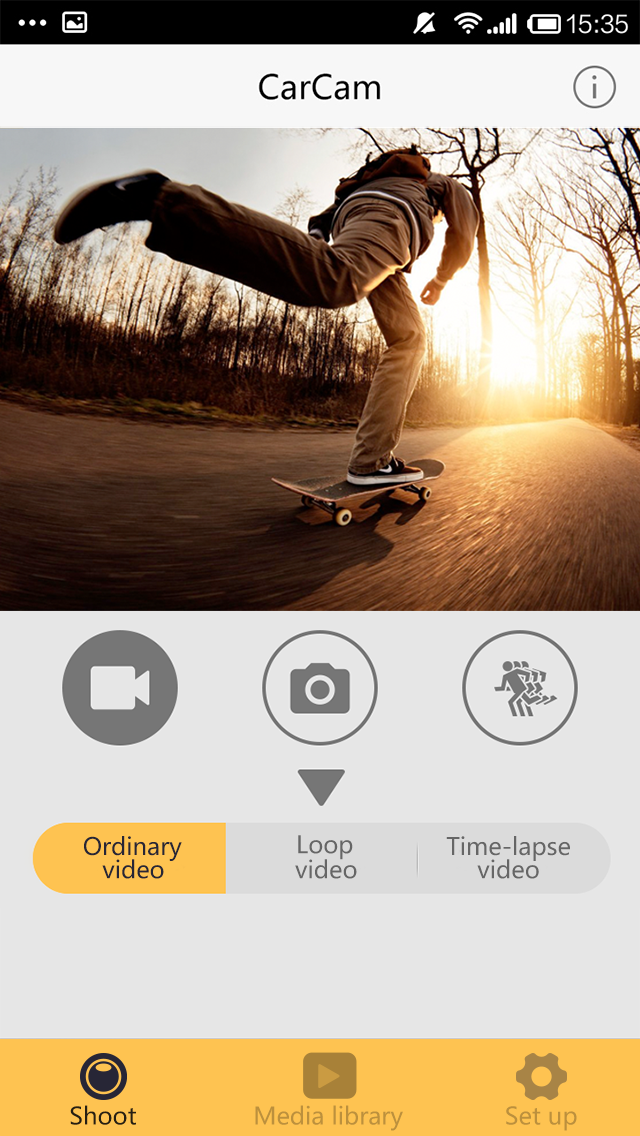
XDV is a remote video surveillance application. Once a device is paired, users can remotely control the camera to take photos, record videos, or capture slow-motion footage, all while monitoring the live feed. These videos can be downloaded to your device or shared directly with family members. The software also offers a wide range of customization options; you can schedule photo or video capture, and adjust camera settings—such as exposure and color—to ensure clearer, higher-quality footage. Additionally, the app allows you to manage your recorded video files remotely, making it easy to back up or delete them.
Live Preview motion DV video screen.
DV can control the motion to take pictures, video, photography slow operation.
Camera features including ordinary camera, time taking pictures, automatic camera, camera trajectory.
Video features include loop recording, time-lapse recording.
Photography can be slow depending on the resolution of fun settin
Set the motion DV terminal directly related settings, such as exposure, white balance and so on.
Connect the process, real-time browsing, file management movement DV terminal, also can be downloaded to the phone side backup.
The software also can be made without connecting motion DV status, pictures or video files have been downloaded.
Familiarize yourself with the main dashboard.
Learn the primary menu structure and navigation.
Understand the toolbar and quick access buttons.
Explore the settings panel and configuration options.
Practice using keyboard shortcuts for common actions.
Create new projects and workspaces.
Import and organize files and data.
Use basic editing and manipulation tools.
Save and export your work in various formats.
Access help documentation and tutorials.
Create folders and organize your projects.
Import files from various sources.
Use search and filter functions to locate files.
Set up automatic backup and version control.
Configure file sharing and collaboration settings.
Just voting to say this app works for me. A handy feature is being able to set the clock to my phone's clock. Gs8000 is my camera's model, since i suspect the software has been released for many different varieties of hardware and apparently does not work with them all according to these reviews.
NOT A CONNECTION ISSUE, HERES HOW try going to the setting, hit the wifi button and when you ONLY see the wifi symbol, that's when you connect. (yes, you only have about 2 second) that means that on your phone, have the password written out and connect at that exact instant. If you see the wifi ingormation, that MAY be too late so just try again.
I was able to download and use the app with windows media player with a few clicks of the mouse. I worked harder getting the mounting for the camera unwrapped. I use an android based phone.
The trick for me was to disable my Mobile Data. I have an original Pixel. I could not get any Action Cam apps to connect to my camera until I disabled Mobile Data. Then they all worked. Tip to XDV, put that in on the google play page or have it be a popup in the app if it's having issues connection.
well i have used this app for sometime and its the only one that works fine with my SJCAM and the DRAGON TOUCH VERSION 3..recording/ photo / sharing / etc all working fine. connecting to the cam wifi simple and quick.
Is XDV free to use?
XDV offers both free and premium features. Basic streaming functionality is available in the free version, while advanced features may require a premium subscription.
Can I record videos with XDV?
Yes, XDV supports video recording functionality. You can record live streams and save them to your device for later viewing or sharing.
Does XDV work with Allwinner Technology cameras?
Yes, XDV is specifically optimized for Allwinner Technology cameras, providing enhanced compatibility and performance with these devices.
How secure is my video stream?
XDV implements industry-standard security protocols to protect your video streams. All data transmission is encrypted to ensure your privacy and security.
Can I share my camera feed with others?
XDV allows you to share your camera feed with authorized users. You can control access permissions and manage who can view your streams.
Take control of your camera with ease and perform an array of functions, including photographic captures, video recording, and even engaging in slow-motion photography to capture every detail. The software offers versatility with multiple camera modes like standard, timer, auto, and trajectory photography, coupled with video options such as loop and time-lapse recording.
Size:32.48MB Version:2.0.49
Requirements:Android Price:Free
Package Name:com.aidewin.x1.view Signature:368ffe1a53b57de5bf348462c21b77bb
Recently, I have noticed that many friends are asking about the photography skills of their mobile phones. In fact, even the best skills cannot compare to an excellent mobile phone photography app. Nowadays, the mobile phone selfie tool can automatically beautify the photos while taking pictures, and the photos taken are beautiful and particularly natural. Which mobile camera app is good? The editor has carefully compiled the ranking of popular photo apps for mobile phones. The editor recommends several excellent mobile photography apps for those who love taking photos. Let's start taking more beautiful photos now.
About us | Contact us | Privacy policy| DMCA
Copyright © 2026 Xiaohei All rights reserved.