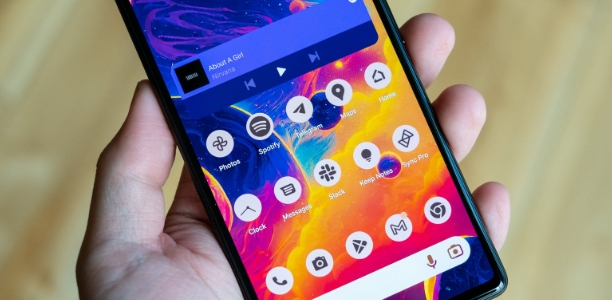
WP Launcher is an impressive theme, wallpaper, and icon editing utility that helps users easily create a customized screen look, bringing you a pleasing visual experience and a better user experience. WP Launcher presents a lightweight, easy-to-use, and feature-rich theme utility. Users can easily try out its powerful search engine to find styles and content that suit their preferences. WP Launcher supports a wide selection of widgets and customizable parameter settings, making your device usage experience even more enjoyable.
Ad Blocking: Enjoy a smooth, uninterrupted experience;
Custom Tiles: Choose different tile sizes and modify tile colors and icons;
Special Feature Tiles: Add special feature tiles, such as time, LED lights, live gallery, and live contacts;
Lock Screen: Customize your lock screen style and password settings;
Status Bar: Customize your status bar style, time display, and color;
Custom Folders: Create new folder tabs, hide and lock folders, and set passwords;
Themes: Backup and restore themes, supporting online theme uploads and downloads;
Wallpapers: Abundant wallpaper resources, supporting lock screen wallpapers and live wallpapers;
App Notifications: Customize the display mode of app message notifications;
Super Search: More powerful and faster web and local information search capabilities.

WP Launcher offers users a variety of customization options, such as changing icon sizes, adding widgets, and choosing different themes. It also provides a variety of live wallpapers that can be set to personal preferences. Furthermore, the app allows you to organize apps into folders for easy access.
One of the most notable features of WP Launcher is the ability to create shortcuts on the home screen. Users can add frequently used apps or contacts directly to the home screen by creating shortcuts. This feature saves time and effort when accessing important files or contacts.

The "Live Contacts" feature requires access to read contact data (avatars);
The "Direct Dialing" shortcut requires "Make a Phone Call" permission;
The "Direct Send Message" shortcut requires "Send Message" permission;
The "Download Themes" feature requires network access permission;
The "LED Lights" feature requires camera access permission.

Pros
A unique Windows Phone-style start screen with resizable, movable tiles.
Powerful tile editing options, including color, image, title, icon, and mapping operations.
Animated and activity-guided tiles, including contact and message-related tiles.
A flexible app list view that supports pinning and hiding apps.
Widget support designed to adapt to tile-based layouts.
Cons
Some lock screen-related features are associated with a separate lock screen app.
The ads will persist unless removed via in-app options.

In summary, WP Launcher (Windows Phone Style) is an excellent choice for users who want to personalize their phone's appearance without sacrificing functionality. Its user-friendly interface is easy for even beginners to use. With abundant customization options, this app gives users complete control over the look and function of their device.
Size:11.8MB Version:3.5.9
Requirements:Android Votes:526

There must be many friends who decorate their phones with theme wallpapers, etc. So which theme stores are free? The editor has selected a variety of free and easy-to-use mobile theme software for everyone, providing a massive amount of exquisite wallpapers in various styles, dynamic and static, to meet everyone's download needs. Fine classification helps users quickly find their favorite themes, and supports users to preview application effects!
These software have the most comprehensive collection of wallpaper themes, and you can update your phone or computer wallpaper at any time. There are various styles of wallpapers with complete classifications, and you can search freely. Moreover, all wallpapers are high-definition images that can be freely adapted to your screen and support downloading and saving locally. The theme wallpaper application software recommends the hottest, latest, and best wallpapers for you. Millions of ultra high definition wallpapers are updated in real-time every day, with a wide variety of themed wallpapers available. There are no samples for changing wallpaper every day.
The Ultra HD Wallpaper app allows you to find a wide range of clear wallpapers, which can be displayed with great clarity on any phone screen. You no longer have to worry about unclear wallpapers when changing devices. Today, the editor has compiled a complete app for ultra HD wallpapers, which you can choose and use according to your own needs. Generally, wallpapers are classified in great detail within software, and you can find wallpapers of any style you like. At the same time, there are super rich dynamic wallpapers for you to choose from, using cool wallpapers to make your phone desktop and lock screen stand out. Friends who like to collect ultra high definition wallpapers, welcome to download related software and experience it on this website!
About us | Contact us | Privacy policy| DMCA
Copyright © 2026 Xiaohei All rights reserved.